AI feedback categorization is the practice of using large language models and machine learning classifiers to automatically assign structured labels to incoming product feedback at scale. Product teams at software companies that use AI tagging to categorize product feedback report processing thousands of items daily that would otherwise sit in a backlog for weeks. Tools like GPT-4, Claude, and Productboard Spark now make it possible to classify support tickets, survey responses, and in-app reports in milliseconds rather than hours. The result is a triage system that is faster, more consistent, and far less dependent on analyst bandwidth.
How to use AI tagging to categorize product feedback
AI tagging, also called automated feedback classification, works by sending each piece of incoming feedback through a language model that matches the text against a predefined taxonomy. LLMs process and classify thousands of feedback items in seconds without needing manual training for each new project. That speed matters because product teams typically receive feedback from five or more channels simultaneously: in-app widgets, support tickets, NPS surveys, Slack threads, and app store reviews.
The most important concept to understand upfront is multi-label classification. A single feedback item can simultaneously carry tags for "bug_report," "churn_signal," and "feature_request," capturing the full complexity of what a user is saying. Forcing that same item into one category loses critical context and degrades routing accuracy downstream. This is why modern AI auto-tagging tools for product feedback default to multi-label outputs rather than single-category assignments.

The practical impact on product decision-making is direct. When every piece of feedback arrives pre-labeled, product managers spend their time on prioritization and strategy rather than reading and sorting. AI-tagged feedback connects directly to product features and roadmaps, reducing the gap between raw user input and roadmap decisions.
What to prepare before you implement AI tagging
The single biggest predictor of AI tagging accuracy is taxonomy quality. Successful teams build a clear vocabulary tailored to their product and organization rather than relying on vendor templates. A generic taxonomy produces generic output.
Before touching any tool, define your category set. The recommended approach is 5 to 8 high-level categories mapped directly to business needs:
- bug_report: Reproducible errors or unexpected behavior in the product
- feature_request: Explicit asks for new functionality or enhancements
- onboarding_friction: Confusion or drop-off during the initial user experience
- performance_issue: Speed, latency, or reliability complaints
- billing_or_pricing: Questions or frustrations tied to cost or payment
- integration_request: Asks for connections to third-party tools or APIs
- positive_feedback: Praise that can be used for retention or marketing signals
Generic tags like "positive" or "negative" are far less useful than focused categories like "bug_report" or "feature_request" because they cannot drive routing or prioritization. Every category you define should map to a team, a workflow, or a dashboard metric.
Next, audit your data sources. AI tagging works best when feedback from support tickets, in-app reports, Slack channels, and survey tools flows into a single pipeline. Fragmented inputs produce fragmented outputs. Decide which channels feed the system before you configure any tagging rules.
Pro Tip: Write a one-sentence definition for each taxonomy category and share it with your engineering, support, and product teams before you configure the AI. Alignment on what each tag means prevents the most common source of downstream confusion.
Step-by-step guide to implementing AI auto-tagging
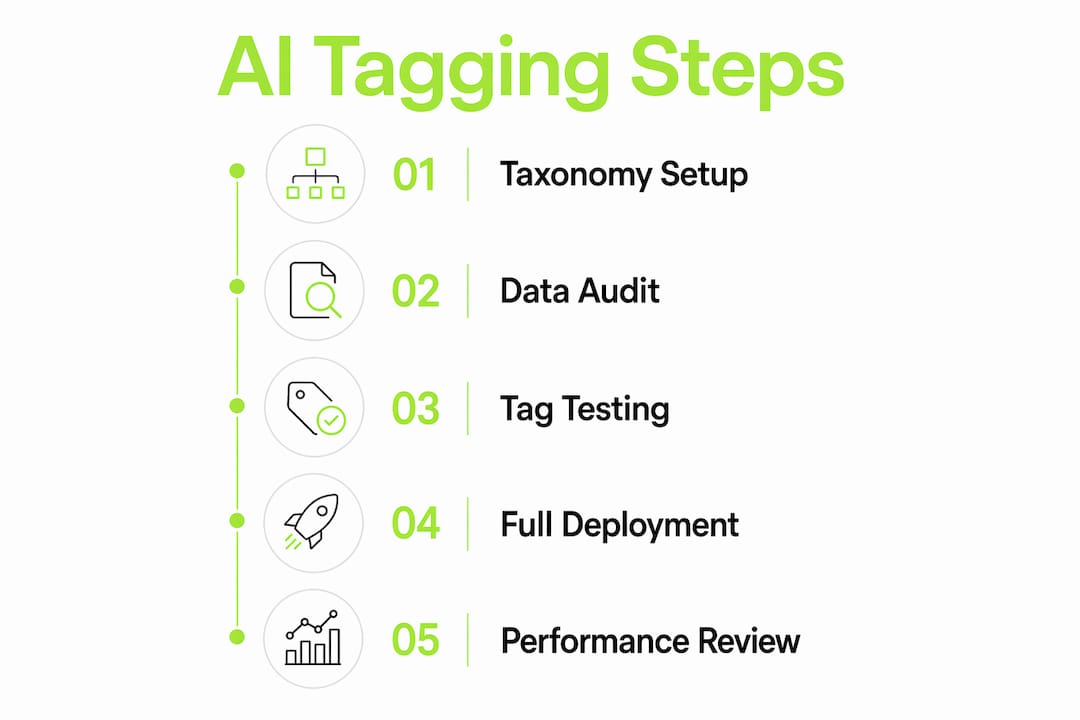
A structured rollout prevents the most common implementation failures. Follow these five steps in order.
Document your taxonomy. Write each category name, its definition, and two or three example feedback items that belong to it. This document becomes the prompt context or fine-tuning reference for your AI model.
Integrate your feedback channels. Connect your primary sources, whether that is Zendesk, Intercom, a custom in-app widget, or a survey platform, to your AI tagging layer via API or native integration. Coevy, for example, embeds a feedback widget directly into your web app and attaches session context automatically, so each incoming item arrives with metadata already attached.
Configure multi-label outputs and routing rules. Set the model to return multiple tags per item. Then define routing logic: items tagged "bug_report" go to the engineering queue; items tagged "feature_request" go to the product board; items tagged "churn_signal" trigger a customer success alert.
Validate accuracy on a sample set. Pull 100 to 200 recent feedback items and run them through the system. Compare AI-assigned tags to what a human analyst would assign. Accuracy below 85% usually signals a taxonomy problem, not a model problem. Refine category definitions and re-run.
Connect tagging outputs to your analytics layer. Raw tags are not insights. Feed tagged data into a dashboard tool like Mixpanel, Amplitude, or a native product analytics platform to track volume trends, category spikes, and week-over-week changes.
The table below shows how each step maps to a measurable outcome.
| Implementation step | Expected outcome |
|---|---|
| Taxonomy documentation | Consistent tag definitions across all channels |
| Channel integration | Unified feedback pipeline with no manual imports |
| Multi-label configuration | Higher routing accuracy and reduced tag loss |
| Accuracy validation | Baseline quality score before full deployment |
| Analytics connection | Trend visibility and spike detection in real time |
Pro Tip: Run your taxonomy through a real sample of 50 feedback items before full deployment. If more than 20% of items feel like they belong in two categories with no clear winner, your taxonomy needs another round of refinement.
Common challenges with AI tagging and how to fix them
Even well-configured systems develop problems over time. Knowing the failure modes in advance lets you catch them before they corrupt your data.
Taxonomy drift is the most common issue. As your product evolves, new features generate new feedback patterns that your original categories do not cover. Tags that once captured 90% of items accurately start missing edge cases. Schedule a quarterly taxonomy review as a standing calendar item, not a reactive fix.
Ambiguous or multi-topic feedback creates classification noise. A user who writes "the export button crashes and also I wish I could export to CSV" is reporting a bug and making a feature request in the same sentence. Multi-label classification handles this natively, but only if your routing rules are configured to act on both tags independently.
Volume surges during product launches or incidents can overwhelm manual review queues if you rely on human spot-checks to catch tagging errors. Build automated quality checks into your pipeline: flag any item where the model confidence score falls below a set threshold and route it to a human reviewer.
The gap between AI tagging and actionable insight is the most common challenge product teams face. Successful teams use an analytics layer to track trends over time rather than treating tagged data as a finished product.
Cross-channel normalization is underestimated. A "bug" reported in an in-app widget and a "bug" reported in a Zendesk ticket may use completely different language. Your taxonomy definitions must account for channel-specific vocabulary, or the model will tag them inconsistently. Review tag distribution by channel monthly to catch normalization gaps early.
For teams scaling fast, AI support that scales with your product volume is not optional. A system that works at 500 tickets per month needs explicit capacity planning before it hits 5,000.
How to measure the impact of AI tagging on your team
Measurement starts with a baseline. Before deploying AI tagging, record how long your team spends on manual feedback triage per week, how many items go unreviewed, and how long it takes a tagged item to reach a product decision.
Automated tagging processes over 5,000 items daily, eliminating the human bottleneck that slows most product feedback pipelines. That volume capacity means your team's analytical energy shifts from sorting to interpreting. The time savings compound quickly: a team that previously spent eight hours per week on manual triage can redirect that capacity to roadmap work within the first month of deployment.
The table below outlines the key metrics to track after deployment.
| Metric | What it tells you |
|---|---|
| Tagging accuracy rate | Percentage of items correctly classified vs. human review |
| Mean time to triage | How quickly feedback reaches the right team or queue |
| Category volume trends | Which issues are growing or declining week over week |
| Untagged item rate | Percentage of items the model could not classify confidently |
| Decision velocity | How fast tagged feedback influences roadmap or sprint decisions |
AI tools detect patterns and connect insights directly to product features, which means your analytics dashboard becomes a live signal for roadmap prioritization rather than a retrospective report. When "onboarding_friction" spikes 40% in the week after a UI change, you know immediately rather than three weeks later.
Pro Tip: Set a monthly review where you compare category volume trends against your product changelog. If a tag spikes after a specific release, you have a direct causal signal. If a tag drops after a fix, you have evidence that the fix worked.
The role of AI in bug prioritization extends beyond tagging. Once feedback is classified, AI systems can rank items by severity, frequency, and user segment, giving engineering teams a prioritized queue rather than a flat list.
Key takeaways
AI tagging automates feedback classification at scale, but its accuracy depends entirely on the quality of your taxonomy design and the analytics layer you build around it.
| Point | Details |
|---|---|
| Taxonomy quality drives accuracy | Build 5 to 8 specific categories mapped to business needs before configuring any tool. |
| Multi-label classification is required | Single-category tagging loses nuance; configure your system to assign multiple tags per item. |
| Analytics layer is non-negotiable | Raw tags are not insights; connect outputs to a dashboard to track trends and spikes. |
| Quarterly taxonomy reviews prevent drift | Product evolution changes feedback patterns; update categories on a fixed schedule. |
| Measure before and after deployment | Establish a triage time baseline so you can quantify the actual efficiency gain. |
What I've learned from watching teams get AI tagging wrong
Most teams I've observed treat taxonomy design as a five-minute task and spend the rest of their time debugging a system that was misconfigured from the start. The uncomfortable reality is that AI tagging is only as smart as the instructions you give it. A model running against a vague taxonomy will produce vague tags, and vague tags produce vague roadmaps.
The second mistake is treating tagged data as the finish line. AI tagging shifts teams from manual triage to automated insight discovery, but it does not replace human prioritization. I've seen product managers assume that because feedback is tagged, it is understood. It is not. A spike in "performance_issue" tags tells you something is wrong. It does not tell you which user segment is affected, whether it correlates with a recent deploy, or how it ranks against a simultaneous spike in "feature_request." That interpretation is still a human job.
The teams that get the most value from AI feedback categorization treat it as infrastructure, not a feature. They invest in taxonomy upfront, review it quarterly, and build dashboards that surface trends rather than just counts. They also keep a human in the loop for low-confidence classifications rather than letting the model guess. That combination of automation and oversight is what separates teams that make faster decisions from teams that just have faster sorting.
If you are starting from scratch, the guide to auto-tagging support tickets is worth reading before you write your first taxonomy category. Getting the foundation right saves months of cleanup later.
— Dizzy
How Coevy automates feedback tagging for product teams
Coevy is built for exactly this workflow. Its embedded widget captures in-app feedback with session context attached automatically, so every item that enters your pipeline arrives with the metadata your AI tagging system needs to classify accurately.

Coevy's AI auto-tagging applies multi-label classification across feedback channels in real time, routing items to the right team without manual intervention. The platform connects tagged feedback to prioritization workflows, so product managers see a ranked, categorized view of user issues rather than a raw inbox. For software teams that need scalable feedback management, Coevy provides the tagging infrastructure, the session data, and the analytics layer in a single GDPR-compliant platform. Explore Coevy to see how it fits your current feedback stack.
FAQ
What is AI tagging for product feedback?
AI tagging for product feedback is the automated process of using machine learning models to assign structured category labels to incoming user feedback. It replaces manual sorting and scales to thousands of items per day without analyst intervention.
How many categories should my taxonomy include?
Use 5 to 8 specific categories mapped to your business needs, such as "bug_report," "feature_request," and "onboarding_friction." Focused categories produce routable, actionable data; generic sentiment tags do not.
Can one feedback item receive multiple tags?
Yes. Multi-label classification allows a single item to carry tags for "bug_report," "churn_signal," and "feature_request" simultaneously, which is more accurate than forcing a single category assignment.
How do I know if my AI tagging is accurate?
Sample 100 to 200 recent items, compare AI-assigned tags to human judgment, and calculate an accuracy rate. Scores below 85% typically indicate a taxonomy definition problem rather than a model failure.
Does AI tagging replace human product managers?
No. AI tagging automates triage but does not replace human prioritization or strategic decision-making. Product managers still interpret trends, weigh tradeoffs, and decide what gets built.